Most budgets fail quietly. Not in January, when everyone agrees on the numbers, but somewhere around month nine, when the comparison against actuals has drifted far enough that people stop opening it. Nobody announces the moment. The report just goes unread.
There are only a handful of ways that drift gets in, and each one is a design decision the planning tool made on your behalf. A line whose total silently double-counts payroll. An approved budget that moves every time someone edits the forecast beside it. A variance report that credits a stronger dollar to the sales team.
Here are seven rules the planning layer in Finrely is held to, and what each one looks like on screen. The figures come from a live account rather than a mockup - which also means one of them is an honest “we don’t know yet.”
One piece of vocabulary before the rules, because everything below leans on it. A driver is the rule behind a line rather than a number typed into it: this cost is a fixed amount per month, that one is a percentage of revenue, this other one follows the headcount you have planned. Set the rule once and every future month follows it.
1. Every line says what it is made of
A cost line in a plan is almost never one thing. G&A is a payroll roster plus everything else. R&D is the same shape. The question that decides whether the plan is arithmetic or fiction is simple: when you type a number into that line, does it mean the whole line, or the part that is not payroll?
Finrely makes you answer it, and then shows the answer back. Each opex line carries a Whole line / Excl. payroll switch and a breakdown underneath it, so the total on the statement is a sum of named components, each with exactly one source.
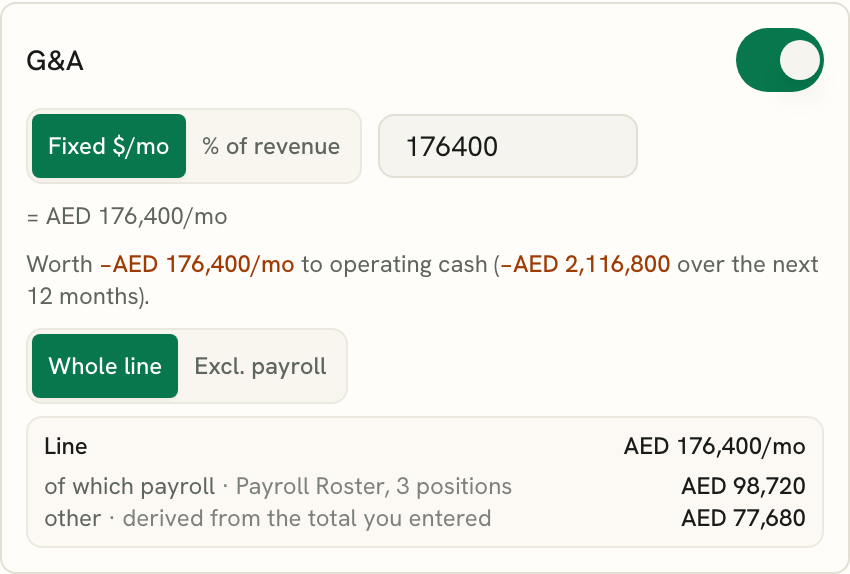
The line is AED 176,400/mo; AED 98,720 of it is three positions in the Payroll Roster, and the remaining AED 77,680 is derived from the total you entered - not added on top of it. If the roster alone comes to more than the total you entered, the card says so instead of quietly showing a negative remainder. What the roster contributes is the fully loaded cost of each position, not base pay: employer on-costs at the rate for that hire’s country, plus benefits and bonus. Across jurisdictions that difference is most of what quietly breaks a G&A line. This demo company reports in AED; the mechanic is the same in any currency.
The failure this prevents is not exotic. It is the most common way a driver-based plan goes wrong: a headcount model and a cost driver both claim the same line, and the plan runs at nearly double the real number for the rest of the year.
2. A variance names how much was the business and how much was the currency
This is the rule that decides whether a multi-currency budget is worth having at all.
A Budget translated at whatever today’s rate happens to be, compared against actuals translated at their own rates, produces a variance that is partly about trading and partly about the exchange rate, with no way to tell which is which. So a Budget in Finrely holds the rate it was built at, for the whole planning period, and the Forecast tracks the latest actual rate. That one decision is what makes the split possible.
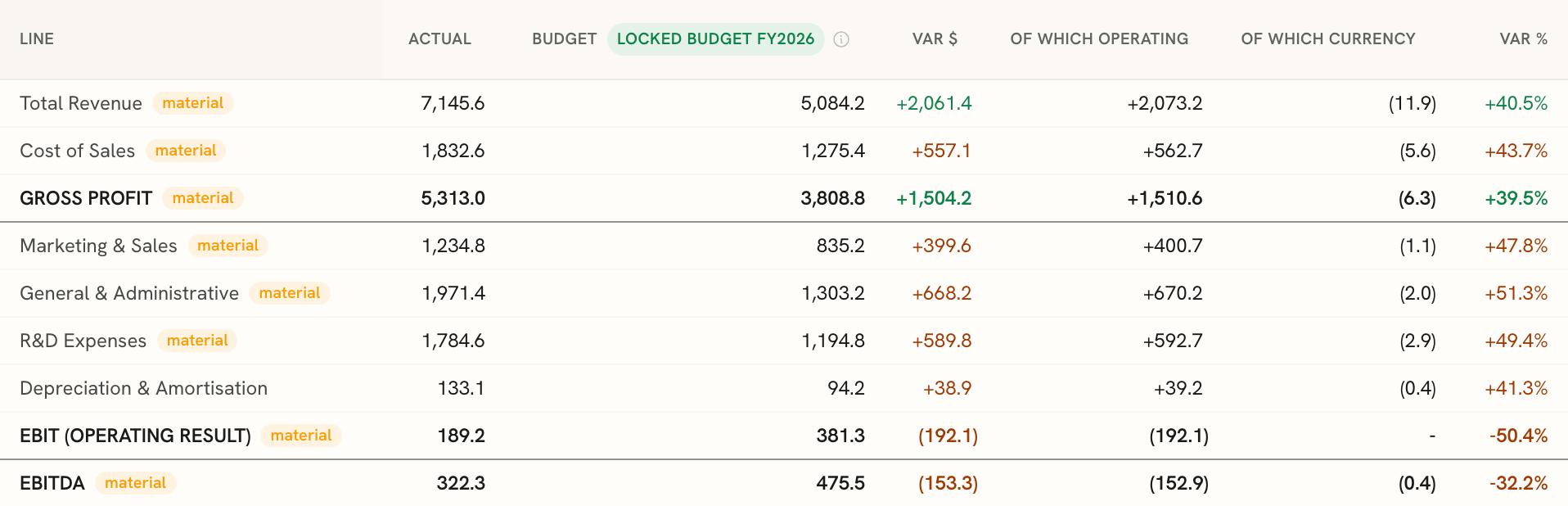
Budget vs Actual across three entities, in USD thousands. Each variance is reported twice over: once as a single figure, then split into the part that came from trading and the part that came from the exchange rate.
The convention is worth stating, because it is the first thing a practitioner will ask about. The currency part is the actual amount, in its own currency, multiplied by the gap between the live rate and the rate the budget was locked at. The operating part is then the whole variance minus that - which means the two always add back to the total exactly, and there is no interaction term left stranded in a footnote. Put the other way round: the operating part is what the variance would have been at the rate you budgeted at, which is the comparison you actually wanted when you asked how the quarter went. Without the split, the row offers one number and leaves someone in the meeting to explain why it does not match what they know about the quarter.
The same rule runs at group level, across entities that keep their own currencies, which is where the arithmetic gets hard enough that people usually stop asking for it.
3. Every assumption carries its cash consequence
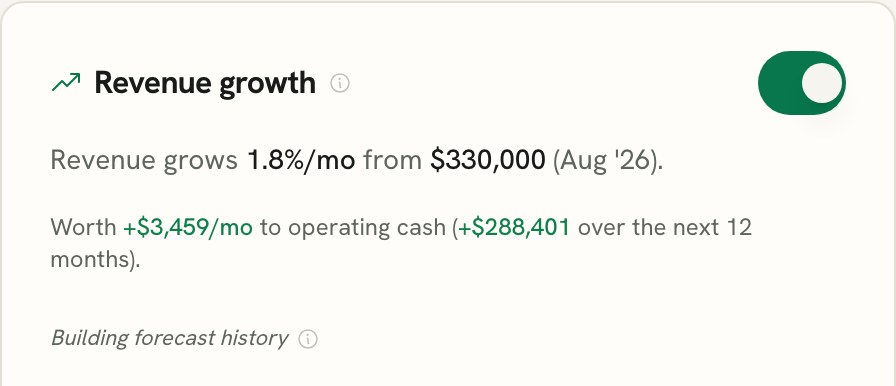
An assumption expressed as a percentage is an opinion. The same assumption expressed in cash is a decision. Every driver in Finrely states what it is worth in operating cash - next month, and cumulatively across the next twelve - in the currency you are reading the report in.
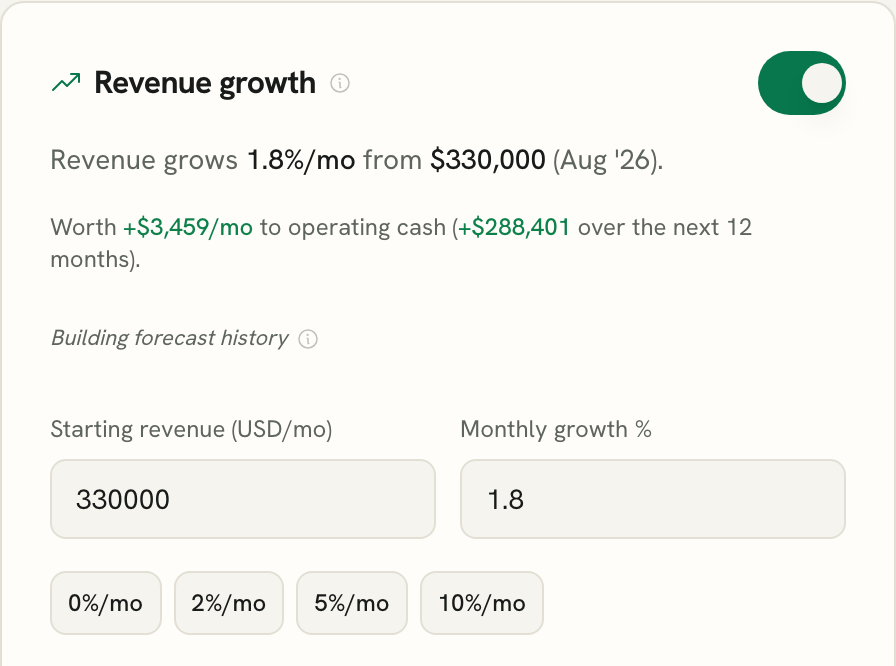
Monthly revenue growth of 1.8%, priced. The second figure is the cumulative twelve-month effect, not the first month repeated - growth compounds, so the two are not a simple multiple of each other.
This is the number people actually argue about in a planning meeting, and it is usually the one nobody can produce while the meeting is still happening.
4. A plan starts from the months you have already closed
Nobody should build next year from a blank sheet. A plan in Finrely begins from your own closed months: Auto-fill from actuals writes the real figure into every closed month that has one, and leaves anything you typed by hand alone. From there you set drivers for the months ahead.
The boundary is the point. A driver only ever projects a month that has not happened yet - it never reaches back and re-derives a month that is already closed. A plan that keeps rewriting its own history is not comparing anything.
5. Once approved, a budget stops moving
An approved budget has to stop moving. Otherwise the version everyone compares actuals against changes every time somebody tweaks an assumption on the working forecast beside it, and “final” turns out to have meant three different things in one quarter.
Locking is one action, and the dialog states its consequences in full before you take it: it freezes the budget’s numbers as your approved baseline, it approves that budget for both the P&L and the Cash Flow because it is one budget rather than two, and from then on editing a driver updates your Forecast only.
A locked budget is never rewritten afterwards - not by a driver, not by an auto-fill, not by anything - which is exactly why the variance you read against it is real rather than zero by construction. The dialog also says you can undo it at any time, and that matters more than it looks: an approval you cannot reverse is an approval people avoid making.
6. Next year’s budget starts without stopping this year
Budgeting season arrives while the current year still has months left to run. You should not have to choose between drafting next year and keeping this year’s comparison alive, and nothing should switch over at midnight on the 1st of January.
In Finrely the next year’s Budget is its own version, sitting beside the current one in the same selector. The current year stays locked and stays the basis actuals compare against, until you explicitly cut over.
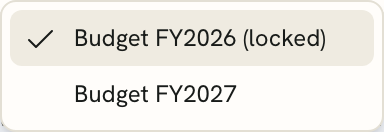
FY2026 is locked and current; FY2027 is open for drafting and carries a “Draft - not yet approved” badge on the report beside it.
7. The accuracy score says “not yet” when it means it
Every revenue and cost-of-sales assumption carries a self-scoring badge: for each closed month it takes the most recent forecast snapshot that already covered that month, and compares it against what actually happened. That makes it a near-term score - usually about a month ahead - and it needs at least three usable closed months before it will show you a number.
A month whose actual came out at or near zero is dropped from the sample rather than clipped, because a percentage error against nothing is not a measurement. On a line with enough clean history behind it, the badge resolves to a figure. On a newer account, it says so.
We would rather ship an honest “not yet” than a percentage with nothing behind it. It is also the more useful signal of the two: a tool that has never shown you how wrong its last forecast was is not being modest about it.
Where this sits
Planning tools split roughly into two groups - the ones that forecast but do not report, and the platforms that do everything and are bought like enterprise software. Finrely is deliberately in neither.
| Forecasting-only tools | FP&A platforms | Finrely | |
|---|---|---|---|
| How you buy it | Usually self-serve | Quote after a call, often with an implementation fee | Self-serve, with the price published on the pricing page |
| Driver-based forecast | Yes | Yes | Yes |
| Cash impact shown per assumption | Rare | Sometimes | Yes |
| Line stated as named components | Rare | Rare | Yes |
| Forecast self-scoring, with an honest empty state | Rare | Rare | Yes |
| Variance split into trading and currency | No | Yes | Yes |
We are not trying to be Pigment. A twenty-person FP&A team with ownership-level modelling and a dedicated analyst needs more than this, and should buy more than this. This is built for the founder or the small finance team who needs a Budget-vs-Actual that survives to month nine, and a next-year plan they can start early, on the books they already keep.
Questions people ask
Do I have to build the plan from scratch? No. Auto-fill from actuals writes your real closed months into the plan, and you set drivers from there for the months ahead. Anything you typed by hand is left alone.
Does the forecast accuracy score work from day one? No, and it does not pretend to. It scores the most recent forecast snapshot that already covered each closed month, so it needs at least three usable closed months before it shows a number. Until then it says “Building forecast history” instead of showing a percentage. Months whose actual came out at or near zero are dropped from the sample rather than clipped.
Can I start next year’s budget before this year closes? Yes. Next year’s Budget is a separate version you draft alongside the current one. This year’s Budget stays locked and stays the comparison basis until you cut over.
What happens to a closed month if I change a driver? Nothing. Drivers only project months that have not happened yet. And once a Budget is locked, nothing rewrites it at all - which is why the variance you read against it is a real number rather than zero by construction.
How does the Budget behave when the exchange rate moves? It holds the rate it was built at, for the whole planning period. The Forecast tracks the latest actual rate. That is what makes the trading-versus-currency split in the variance report possible.
Which systems does this read from? Budgets and forecasts run on whatever base and presentation currencies your company reports in. On the data side, Finrely reads QuickBooks, Xero, Zoho Books and Odoo, plus Stripe.
Is this a replacement for a full FP&A platform? For a founder-led or small finance team, for planning and budget-vs-actual specifically, generally yes. For a team that needs ownership-level consolidation modelling or a dedicated analyst workflow, this is a lighter layer, not a replacement.
See it on your own numbers
Connect a source and watch a board-ready pack assemble itself - every figure traceable.